Sell out before you start baking.
Set up your bake day menu, share one link, and collect paid pre-orders — all before you turn on the oven. No more DMs, no more guessing how much to bake.
Free for your first 2 months • Android & iOS
Get paid upfront
Collect payment before you bake
One shareable link
Your storefront, always ready
Auto bake lists
Know exactly what & how much to make
Everything you need to run bake days without the chaos.
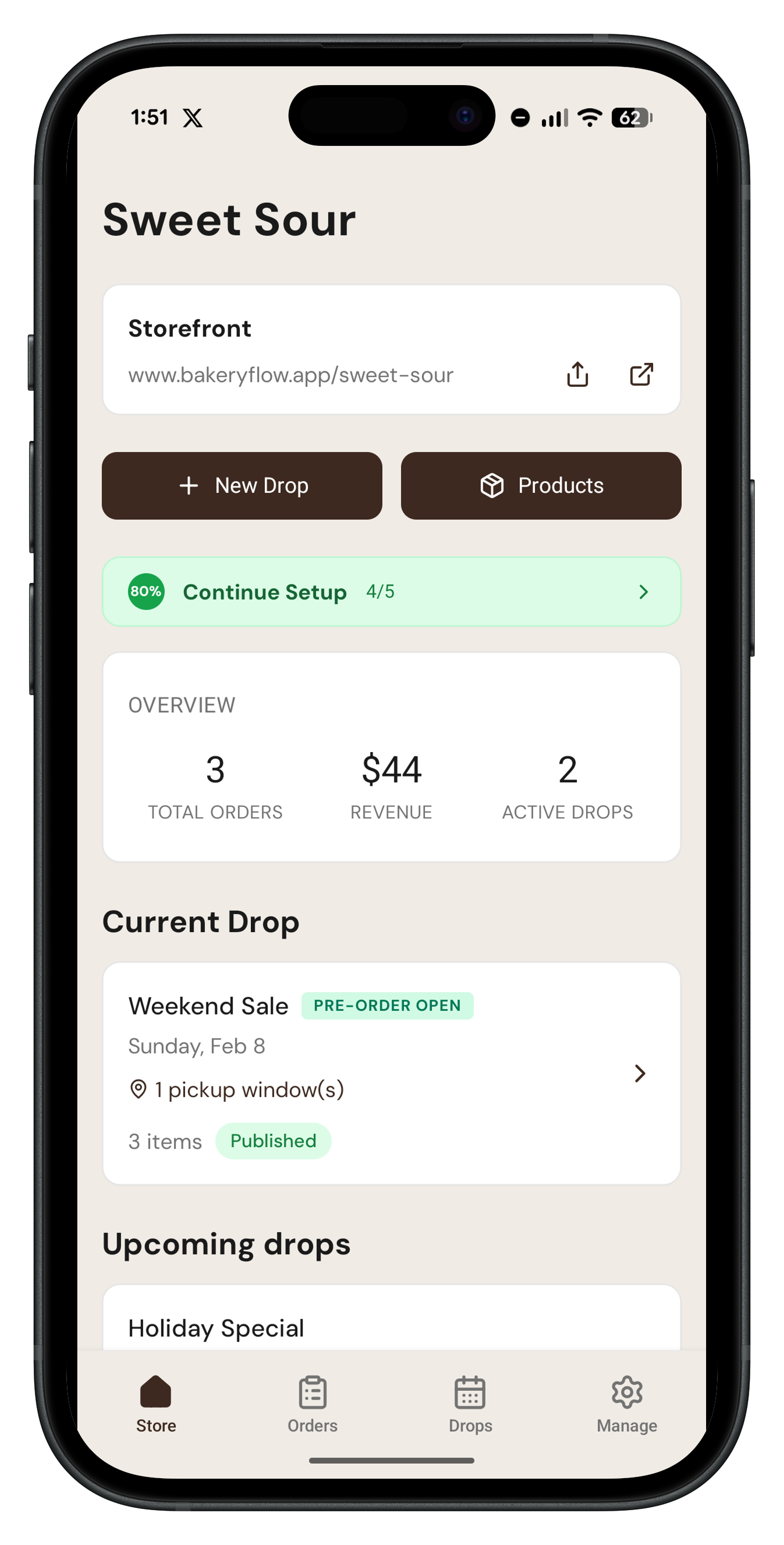
Stop juggling DMs, spreadsheets, and payment screenshots. BakeryFlow keeps your menu, orders, payments, and prep in one place.
Your own storefront 🏪
One link your customers visit to see your bake day menu, place pre-orders, and choose a pickup time. Drop it in your Instagram bio and you're set.
Pre-orders, not DMs 💬
Customers shop your menu like a normal store — no forms, no DMs. Every order appears in your list, ready to use as your bake prep list.
Flexible payments 💳
Accept payment through Credit or Debit Cards, Venmo, CashApp, Zelle, or cash — whatever works for you and your customers. Get paid securely and upfront.
Who uses BakeryFlow
If you take pre-orders for a bake day, BakeryFlow was made for you.
How a bake day works with BakeryFlow
Set up once, share your link, and watch pre-orders roll in. Here's the flow.
Plan your bake day
Pick a date, add your menu items, set quantities, and choose pickup windows — your bake day is ready to go live.
Share & collect pre-orders
Post your storefront link on Instagram, text it to regulars, or pin it in your bio. Customers order and pay upfront — no DMs needed.
Bake, fulfill, done
Your bake list tells you exactly what to make. Track pickups, mark orders complete, and close out your day — all from the app.
See it from your customer's perspective
Want to know exactly what buying from you feels like? Visit our mock storefront, Sweet & Sour Bakery. Browse the menu, select a pickup window, and place a test order.
Built for bakers who want to sell out fast
Every screen is built around the bake day workflow — from setting up your menu to tracking the last pickup.
Your storefront
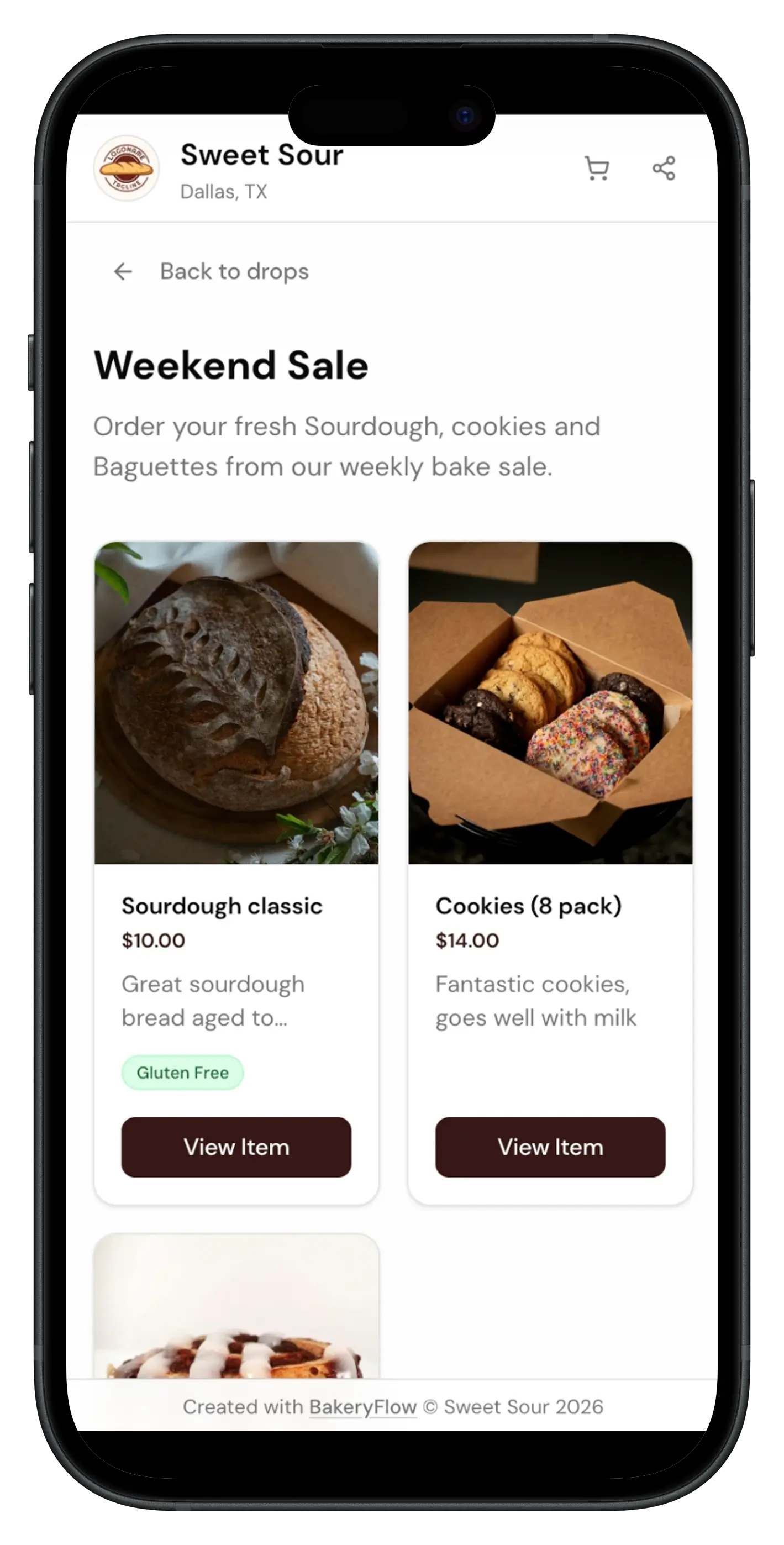
This is what your customers see — your menu, prices, and pickup times. They order and pay right here.
Bake day setup
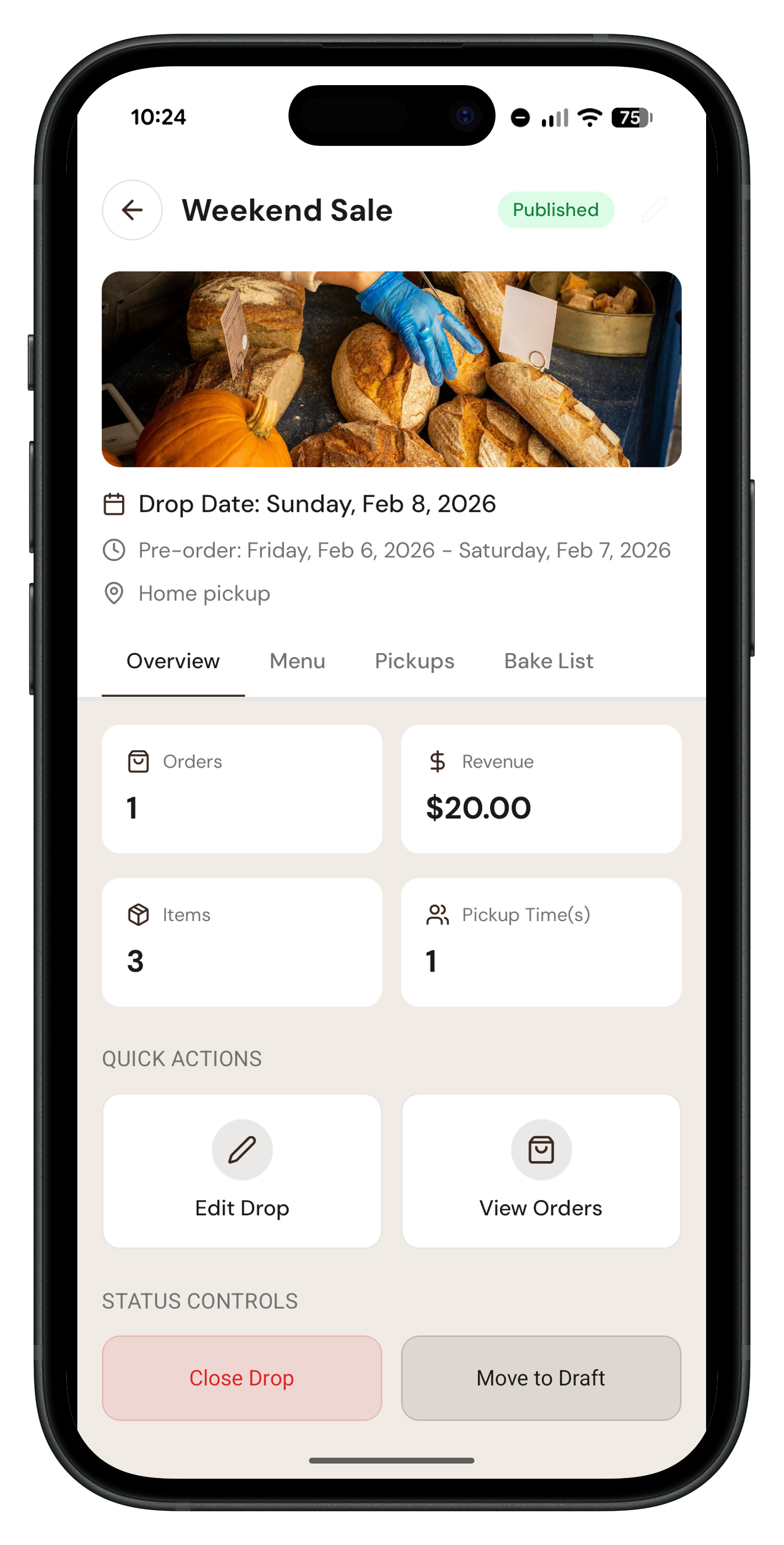
Choose your date, add items from your catalog, set quantity limits, and set when ordering opens and closes.
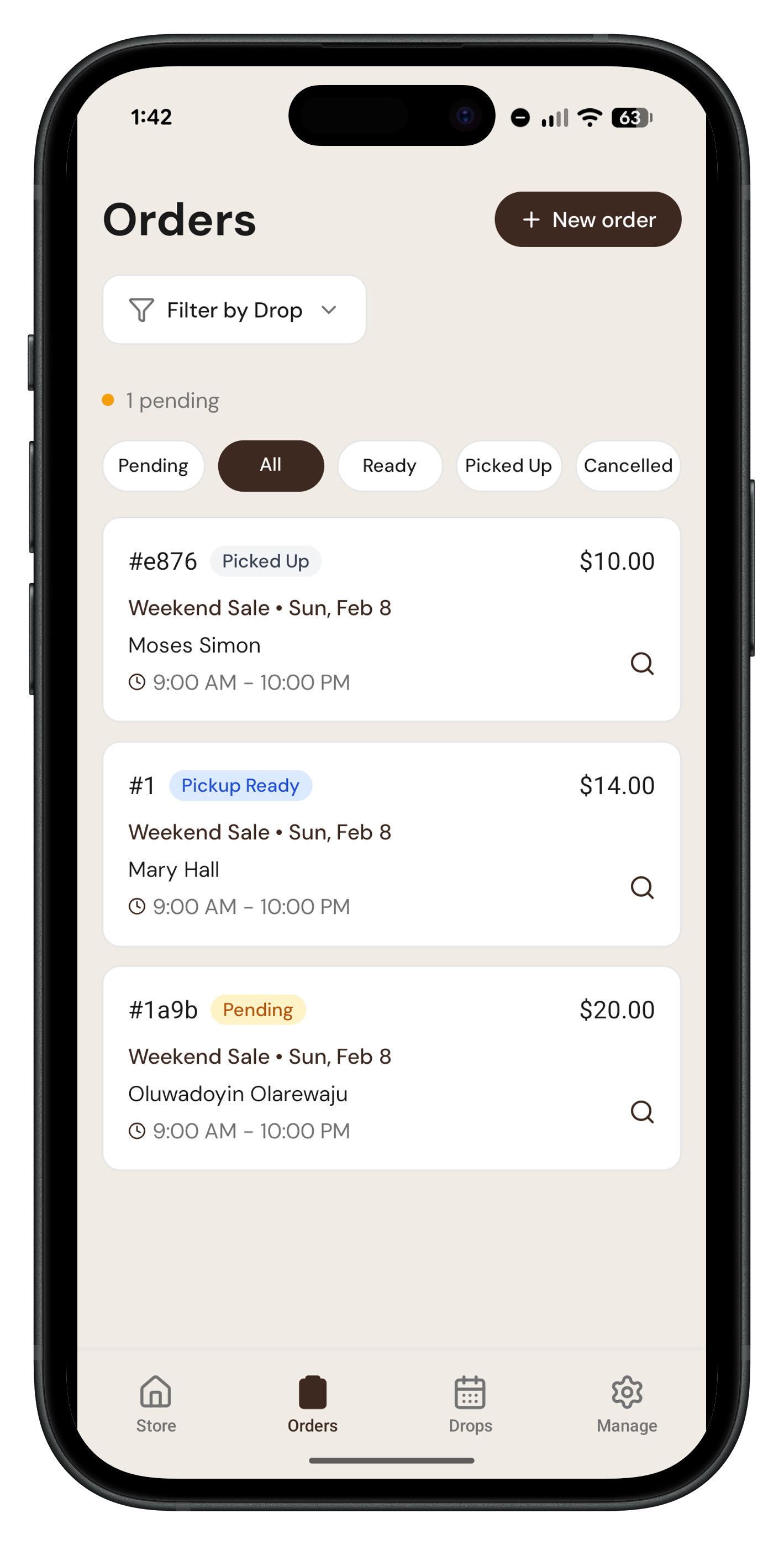
Order management
See every pre-order at a glance. Mark orders as paid, packed, or picked up so nothing slips through.
Dashboard
Your at-a-glance view of upcoming bake days, total orders, and revenue — all in one place.
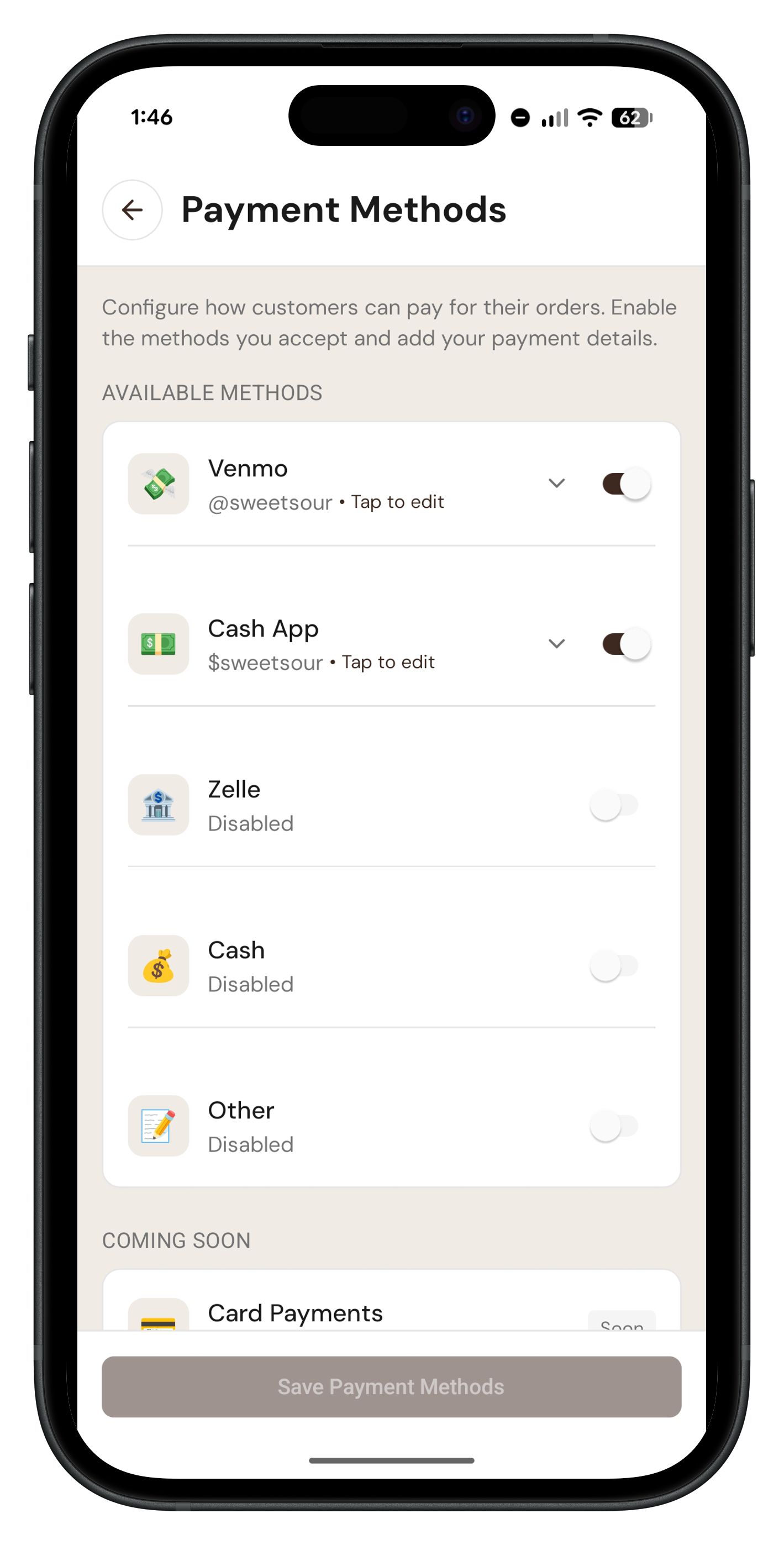
Payment options
Show customers exactly how to pay. Flexible payment methods that work for everyone.
Screens from the actual app using sample bakery data.
DMs & spreadsheets vs. one calm workflow
Here's what changes when you stop taking orders through social media and switch to BakeryFlow.
Without BakeryFlow
- ❌ Chasing orders across DMs, comments, and Google Forms.
- ❌ Manually tracking who paid and who didn't.
- ❌ Counting quantities by hand to figure out what to bake.
- ❌ No idea if you'll sell enough to justify baking.
With BakeryFlow
- ✅ One link, real order forms, and upfront payment.
- ✅ Automatic bake lists — know exactly what to make.
- ✅ Track every order from placed → paid → picked up.
- ✅ Sell out before you start baking. Every time.
Straightforward pricing for every bakery stage.
Try BakeryFlow free for 2 months, then keep going on the plan that fits your business.
Monthly plan
Flexible for bakeries testing or growing month to month.
Yearly plan
Save more with annual billing.
Start free for your first 2 months.
Then continue on monthly or yearly billing from your bakery settings.
Frequently Asked Questions
A few quick answers about BakeryFlow.
What is BakeryFlow?⌄
BakeryFlow is a mobile app built for home bakers and cottage bakeries who sell through bake days (also called drops). You set up your menu, share one storefront link, and collect pre-orders and payment before you ever turn on the oven. No more DMs, no more spreadsheets.
What's a bake day or drop?⌄
A bake day (called a Drop in the app) is a scheduled selling event on a specific date. You set your menu, open ordering for a time window, and customers pre-order before you bake. Think of it like a pop-up shop: online, organized, and done before you start mixing.
How does the order process work?⌄
You set up a drop, then share your unique storefront link (perfect for your Instagram bio). Customers browse your menu, pick their items, and place their order, including choosing a pickup window. BakeryFlow aggregates everything into an auto-generated orders list so you know exactly what and how much to make.
Do customers need to create an account?⌄
No. Customers order directly from your storefront link. No BakeryFlow account, no app download, no friction. They visit the link, pick their items, provide some basic information which is made available to you in the app, and submit their order.
How do customers pay?⌄
You set up the payment methods that work for you: credit or debit cards, Venmo, Cash App, Zelle, or cash. For non-card payments, customers see your payment instructions on the order confirmation page and pay you directly. Card processing is done by Stripe.
What are pickup windows?⌄
Pickup windows are time slots you set for your bake day, for example Saturday 10am-12pm or Sunday 2pm-4pm. Customers see these on the storefront so they know when to pick up.
Can I set limits on how many I sell?⌄
Yes. When setting up a drop, you can set quantity limits per item so you never oversell. When an item sells out, it is automatically marked unavailable on your storefront.
How do I track orders and fulfill them?⌄
From the app, you can see every order. Mark orders as paid, packed, or picked up as the day goes on.
Does BakeryFlow do recipe costing?⌄
The main BakeryFlow app is a pre-order app for home bakers — storefront links, quantity limits, and bake lists. For free recipe costing, ingredient inventory, and product pricing, use BakeryFlow Inventory at inventory.bakeryflow.app — a separate free tool, not part of the pre-order app.
Is BakeryFlow free?⌄
Yes. BakeryFlow is free for your first 2 months. After trial, choose $6.99/month or $60/year.
How much does BakeryFlow cost?⌄
After your 2-month free trial, BakeryFlow is $6.99/month or $60/year.
Does the fee apply to Venmo and Zelle orders?⌄
BakeryFlow pricing is subscription-based after trial. Payment method does not change your plan price.
Are there any other fees I should know about?⌄
No hidden BakeryFlow platform fees. After the free 2-month trial, you only pay your selected plan ($6.99/month or $60/year).
Is BakeryFlow available on iPhone (iOS)?⌄
Yes. The baker app is on the App Store and Google Play.
Do I need a commercial kitchen or license to use BakeryFlow?⌄
BakeryFlow is just the tool. Whether you need a license depends on your local cottage food laws. In many US states and Canadian provinces, home bakers can legally sell baked goods without a commercial kitchen license. Check our free state-by-state cottage food law guides.
Ready to sell out before you start baking?
Download the BakeryFlow app and start taking orders today.
BakeryFlow App
Get started with your first bake day in minutes. Manage your menu, track orders, and collect payments all in one place.
Free for your first 2 months • Android & iOS